





Passkey
passˌkee noun
Passkeys pave the path to passwordless authentication, moving away from passwords responsible for 80% of breaches today. A passkey is an authentication credential based on FIDO standards, that can be stored on your phone or computer, or in a hardware security key allowing a user to sign in to apps and websites with the same process that they use to unlock their device (biometrics, PIN, or pattern). Passkeys are FIDO cryptographic credentials that are tied to a user’s account on a website or application. With passkeys, users no longer need to enter usernames and passwords or additional factors. Instead, a user approves a sign-in with the same process they use to unlock their device (for example, biometrics, PIN, or pattern).
The word passkey is a common noun; think of it the way you would refer to password. It should be written in lowercase except when beginning a sentence or used in a title. The term passkey (and plural form passkeys) is a cross-platform general-use term, not a feature tied to any specific platform.
Note: FIDO2 is an open authentication standard that was developed by the FIDO Alliance. Passkeys are built on FIDO2 specifications. If you are looking for more information about FIDO2, refer to the Users Authentication Specifications Overview for more information.
Passkeys Explained
Passkey Central offers guides, resources, and tested solutions to help with your passkey implementation
Passkey Adoption
People and organizations are rapidly adopting passkeys. In a 2024 independent survey commissioned by the FIDO Alliance, 53% of people reported enabling passkeys on at least one of their accounts, with 22% enabling them on every account they possibly can. Visit FIDO Research to view the latest user adoption trends.
Why Passkeys?
77%
hacking-related breaches involve stolen credentials – Source: Verizon
48%
of people abandoned an online purchase simply because they forgot their password – Source: FIDO Alliance World Passkey Day 2025 Consumer Password & Passkey Trends
3,000%
increase in AI-powered phishing attacks targeting corporate credentials – Source: SlashNext Prepare for 2025: 2024 Phishing Intelligence Report
47%
success rate from AI-powered spear phishing attacks specifically when targeting trained security professionals – Source: IBM X-Force 2025 Threat Intelligence Index
36%
of people had at least one account compromised due to passwords – Source: FIDO Alliance World Passkey Day 2025 Consumer Password & Passkey Trends
Based on Open Standards
FIDO standards use standard public key cryptography techniques to provide phishing-resistant authentication
Phishing-Resistant
Unlike passwords, passkeys are always strong and phishing-resistant
Scalable
FIDO protocols are designed to be scalable and can be used by any website or application
Faster, Simpler Sign-ins
Enables password-only logins to be replaced with secure and fast login experiences across all users’ devices
99.99%
Reduction in exposure to phishing and credential theft – Source: Yubico
6x
Faster sign-in times – Source: Amazon
4x
Improvement in sign-in success rate (vs passwords) – Source: Google
50%
Reduction in login abandonment rates – Source: Air New Zealand
98%
Reduction in mobile account takeover fraud – Source: CVS Health
70%
Increase in sign-in conversion rate Source: Dashlane
81%
Reduction in login-related help desk incidents – Source: FIDO Alliance Passkey Index
*100% passwordless environments
**View the sources for the statistics here.
Benefits of Passkeys
Organizations who implement support for passkeys see the following benefits as passkey use increases:

Improvements for the end user experience
- Higher sign-in success rates
- Faster time to sign in
- Safer, more secure, and faster online experiences
- Cross-device and ecosystem availability

Business improvements
- Higher sign-in success rate, higher conversions, repeat purchases, and less downtime
- Reductions in phishing, credential stuffing, and attack surface
- Lower rate of cart abandonment
- Reduction in need for password resets during account recovery
- Decrease in need for customer support and help desk tickets
- Increase in customer loyalty and retention

Lower costs associated with:
- Service costs for authentication methods such as SMS text messages
- Monitoring and defending malicious actors in real-time
- Continuous hardening of traditional authentication solutions
- Account reset due to forgot password and account lockout
From these examples, you can see that passkeys benefit both your organization and your end users.
You can view the latest user adoption trends https://fidoalliance.org/content/research/.
Created for Security
According to Verizon’s 2024 Data Breach Investigations Report, the overall reporting rate of phishing has been growing over the past few years. Credential breaches and exploitation of vulnerabilities are also growing security concerns.
Passkeys are phishing resistant and secure by design. They inherently help reduce attacks from cybercriminals such as phishing, credential stuffing, and other remote attacks. With passkeys there are no passwords to steal and there is no sign-in data that can be used to perpetuate attacks.
The passkey approach provides an improved security model over traditional authentication and multi-factor authentication. Even better, passkeys are also easier for people to use and result in 20% more successful sign-ins over passwords. For more information, refer to Passkey Security.
Get Started with Passkeys
FIDO offers multiple resources related to passkeys. Here are some places to start as you explore passkeys and to help when you’re ready to implement support for passkeys.
- Passkey Central – This site is intended to introduce people in all roles of an organization to passkeys, by guiding you through research and planning for the implementation of support for passkeys at your organization, providing helpful information to get you started, as well as resources to maintain passkeys after implementation.
- Use Cases – Refer to this section to learn about passkey use cases for:
- Consumer
- Enterprise
- Government
- Automotive
- Design Guidelines – Resources to help you build out a UI when implementing support for passkeys.
- User Communications – Resources to help you communicate with users on topics such as introducing passkeys, explaining the benefits of passkeys, and communicating passkey status updates such as when a passkey is added or removed.
- Passkey Directory – View businesses and organizations who have leveraged passkeys to provide secure logins for their employees and clients. You can also view live examples of support documentation.
- Get the FIDO Passkey Icon – Service providers providing sign-ins with passkeys should use the passkey icon to indicate to their users that they can securely and easily sign in to their website or app without passwords. Visit Get the FIDO Passkey Icon to view the agreement and download the passkey logos.
Passkeys FAQ
Passkeys are a password replacement technology.
A password is something that can be remembered and typed, and a passkey is a secret stored on one’s devices, unlocked by the user the same way they unlock their device (biometrics, security key, PIN, pattern, etc.).
Unlike passwords, passkeys are phishing-resistant, are always strong, and are designed so that there are no shared secrets.
Passkeys simplify account registration for apps and websites, are easy to use, work across all of a user’s devices, and even other devices within physical proximity.
From a technical standpoint, passkeys are FIDO credentials for passwordless authentication. Passkeys replace passwords with cryptographic key pairs for phishing-resistant sign-in security and an improved user experience. The cryptographic keys are used from end-user devices (computers, phones, or security keys) for user authentication. Passkeys can be securely synced across a user’s devices, or bound to a particular device (device-bound passkeys).
The cryptographic keys are used from end-user devices (computers, phones, or security keys) for user authentication.
Passkeys can be securely synced across a user’s devices, or bound to a particular device (device-bound passkeys).
When a user is asked to sign in to an app or website, the user approves the sign-in with the same biometric or PIN or on-device password that the user has to unlock their device (phone, computer, or security key). The app or website can use this mechanism instead of the traditional username and password.
The same standards, commonly known as FIDO2 (WebAuthn and CTAP), are leveraged to deploy FIDO with passkeys for sign-in. The WebAuthn standard covers the browser API that manages passkeys.
The word “passkey” is a common noun; think of it the way you would refer to “password”. It should be written in lowercase except when beginning a sentence.
The term “passkey” (and plural form “passkeys”) is a cross-platform general-use term, not a feature tied to any specific platform.
When delineation is required, passkeys that are synced between user’s devices via a cloud service are generally referred to as “synced passkeys”, and those that never leave a single device (including those on FIDO security keys or UAF apps) are referred to as “device-bound passkeys.”
Yes. There is no change to the local biometric processing that the user devices (mobile phones, computers, security keys) do today. Biometric information and processing continues to stay on the device and is never sent to any remote server — the server only sees an assurance that the biometric check was successful.
The primary use case for passkeys is replacing the password as the first/primary factor for account authentication. Since passkeys are phishing-resistant and easy to use, they also can replace legacy multi-factor authentication flows, such as password plus SMS OTP. There are other use cases for passkeys, such as in online payment scenarios, within identity wallets, and for automotive, to name a few.
For years, passwords have been subject to phishing attacks and credential stuffing attacks, due to the prevalence of password reuse and database breaches.
Because the primary factor — the password — is fundamentally broken and can be compromised in multiple ways, the industry has seen widespread adoption of layering on an additional second factor and moving to passwordless. But unfortunately the most popular forms of second factors — such as one-time passwords (OTPs) and phone approvals using apps — are both inconvenient and still phishable.
Passkeys are a primary factor that — standing alone — are more secure than the combination of either “password + OTP” or “password + phone approval”.
A passkey provider is responsible for the creation and passkey management of a user’s passkeys. A passkey provider can be a browser or operating system vendor where passkeys are stored and synced within the built in credential manager (such as iCloud keychain or Google password manager), or a third party provider where passkeys are stored and synced within a third party app or browser extension (such as 1Password or Dashlane).
Yes. Passkey syncing is end-to-end encrypted, and passkey providers have strong account security protections.
When a user creates a passkey on any of their devices, it gets synced to all the user’s other devices using the same passkey provider that is also signed into the same user’s account. Thus, passkeys created on one device become available on all devices.
Notably, if the user gets a new device and sets it up with their passkey provider, the user’s passkeys are synced and available for sign-in on the new device.
Syncing is critically important for the FIDO Alliance to achieve its mission, which is to make sign-in easier and fundamentally safer by replacing passwords in as many places as possible.
This is because password replacement technology means “competing” with passwords across three dimensions:
- Speed: should be faster than creating or using a password.
- Convenience: should be at least equally as convenient — if not more convenient — than using a password.
- Security: should be phishing-resistant, and should be guaranteed to be unique per app/website/service.
Speed
The creation of passkeys eliminates the need for users to comply with password complexity requirements. Registration is as simple as a biometric auth or entering a PIN code, and subsequent sign-in attempts with a passkey again only require a biometric authentication or PIN code — both faster than typing in a password.
Convenience
The usability of password replacement technology must compete with the convenience of passwords, and one of the primary usability benefits of passwords is that they can be used from any device.
Syncing means that passkeys are available from all of a user’s devices using the same passkey provider. And just like passwords, visiting a website from another device does not require going through a credential registration/creation flow — cross-device sign-in is supported via an enhancement to the FIDO Alliance Client to Authenticator Protocol (CTAP) that uses Bluetooth Low Energy (BLE) to verify physical proximity.
If the cryptographic key is bound to the user’s computer or mobile device, then every time the user gets a new device, the RP would have to fall back to other methods of authentication (typically a knowledge-based credential such as a password). In practice, this often means that the first sign-in on a new device will be inconvenient and phishable.
Passkeys solve this issue because they are available on the user’s device if and when the user needs them — starting from the very first sign-in to a website from that device. Lastly, users often forget passwords and don’t set up backup emails and phone numbers. With passkeys, as long as the user has their device, they can sign in; there is nothing to forget. Because passkeys can be backed up, they can be better protected from loss.
Security
Passkeys, which are FIDO credentials, allow relying parties (which face a constant threat of phishing, credential stuffing, password database breaches, etc.) to replace passwords with FIDO credentials. FIDO offers relying parties a challenge-response authentication protocol based on asymmetric cryptography. This means phishing-resistance, and the elimination of sensitive secrets on the server, resulting in a huge step forward in security.
Phishing resistance is a core design goal of FIDO Authentication. This goal is achieved at sign-in whether or not the cryptographic keys are bound to hardware. Furthermore, breaches of password databases (which can be an attractive target for hackers) no longer pose a threat as there are no passwords to steal.
RPs use the built-in WebAuthn API (for websites) and platform FIDO APIs (for apps) to exercise passkeys for sign-in.
Passkeys are supported in all major operating systems, internet browsers, and by third-party passkey providers.
Device-bound passkeys in modern hardware security keys offer the highest security assurance.
Security keys store passkeys securely on hardware, delivering phishing-resistant, device-bound protection that has been proven to be the highest level of assurance, all while providing evidence of how and where the passkey is stored.
Some users want stronger possession. Some want independence from platform sync. Some need a credential that works across shared, restricted or unusual environments. A user may want hardware-bound protection for a bank account, email account, GitHub account, crypto wallet, healthcare account or creator account.
For enterprises onboarding and recovery create downstream account recovery risks, using security keys eliminates the need for weak backup codes or helpdesk resets, ensuring security never gets downgraded even during device loss or replacement.
Convenience
Security keys are not only for people with elevated threat models. For some users, they may be the easiest way to sign in — or the only practical way.
Not everyone owns a smartphone. Not everyone can use touchscreen biometrics comfortably. Not everyone can complete a QR-code, phone-pairing or app-based flow. Some users have physical, cognitive, financial, environmental or practical reasons for preferring a USB or NFC security key.
A USB security key with a PIN and a single touch can be simpler than a smartphone-dependent flow. It requires no app install, no Bluetooth pairing, no biometric sensor, no camera positioning and no cloud sync account. Enrollment may still need care, but daily use can be straightforward.
Security
Passkeys are more secure and easier to use than passwords, but how you create them matters. Passkeys backed by passwords or synced across devices are vulnerable to theft. Device-bound passkeys offer a phishing-resistant, hardware backed root of trust.
FIDO has defined cross-device authentication for this use case. Cross device authentication allows a user to sign in with their device using a QR code.
FIDO Cross-Device Authentication (CDA) allows a passkey from one device to be used to sign in on another device. For example, your phone can be linked to your laptop, allowing you to use a passkey from your phone to sign into a service on your laptop. You can also use a device-bound passkey on a hardware security key to sign-in. You can even use a combination of passkeys to secure your accounts.
CDA is powered by the FIDO Client-to-Authenticator Protocol (CTAP) using the Proximity Exchange Protocol (“PXP). CTAP is implemented by authenticators and client platforms, not Relying Parties.
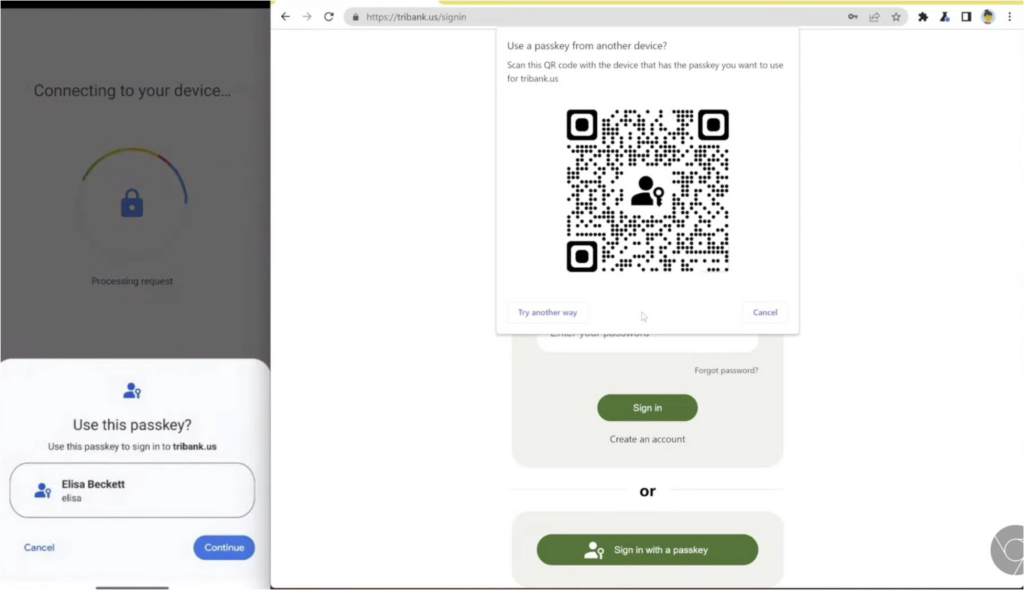
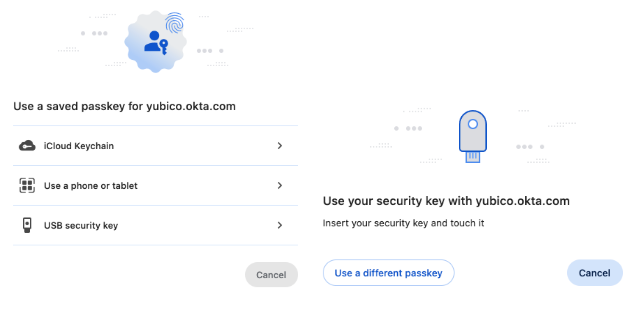
The FIDO Cross-Device Authentication flow, which leverages CTAP 2.2, uses Bluetooth Low Energy (BLE) to verify physical proximity, but does not depend on Bluetooth security properties for the actual security of the sign-in. The CTAP transport, named ‘hybrid’, uses an additional layer of standard cryptographic techniques — on top of standard Bluetooth security properties — to protect data.
Passkeys are a passwordless authentication method that uses public-private key cryptography and biometric verification to provide stronger security than traditional passwords while offering a simpler user experience through secure storage on devices, in the cloud, or on hardware security keys. Passkeys leverage multiple factors for authentication: the passkeys are kept on a user’s devices (something the user “has”) and — if the RP requests User Verification — can only be exercised by the user with a biometric or PIN (something the user “is” or ”knows”).
RPs may be concerned that a passkey could be made available to an attacker through a single factor (say, a password) from the passkey provider account. In practice, however, this is not usually the case: passkey providers consider multiple signals beyond the user’s password — some visible to the user, some not — when authenticating users and restoring passkeys to their devices.
Device-bound passkeys offer compliance with the most stringent requirements across industries.
Note that some regulatory regimes still have to evolve to recognize passkeys as one of the officially listed forms of multi-factor authentication. This is an area of active engagement for the FIDO Alliance.
If a user utilizes a cross-platform credential manager, configuring the provider on their new device will make their passkeys available on that device.
If the user stores their passkeys on a FIDO Security Key, they can use it to securely authenticate on the new device and experience a portable root of trust across different devices.
If the user is not using a cross-platform credential manager and is still in possession of their old device, the user can use the passkey on the old device (say, an iOS device) to sign the user into their account on the new device (say, an Android device). Once signed in, the user can create a passkey in the new device’s provider.
In other cases, the RP can treat sign-in from the new device (which might be from a different vendor) as a normal account recovery situation and take appropriate steps to get the user signed in.
Yes, FIDO Security Keys contain device-bound passkeys since 2019, when FIDO2 added support for passwordless sign-ins via discoverable credentials with user verification. All the client platforms and browsers have native support to exercise security keys already. Security key vendors may choose to support passkey synchronization in the future.
Since all passkeys are FIDO credentials, a web service implementing support for FIDO will be able to support all passkey implementations.
Specific environments with particular compliance needs may be required to guarantee there is only one copy of the cryptographic key available. Passkeys on FIDO Security Keys are a great solution for such use cases.
Organizations or individuals with a low risk tolerance for cyberattacks, particularly those handling highly sensitive data or operating in critical sectors, will benefit most from device-bound passkeys.
Also, in scenarios where a user has lost access to all of their other mobile and other devices where their passkeys have been synced, FIDO security keys can act as a recovery credential.
Device-bound passkeys in modern hardware security keys offer the highest security assurance.